
Local Thoughts - How 2 days obsessing over agent memory led to DuckBrain
or: what happens when you point DuckDB at agent memory

Three weeks ago I wrote a post about AI agent harnesses. The short version: a harness is the chassis, the steering, and the sensors - the engineering that connects a model’s power to the wheels. It gives a weaker model structure, tools, and guardrails so it can still produce good output. Memory - often part of the harness - works the same way.
Here’s the thing that pushed me over the edge: it’s deeply frustrating to repeat yourself. Not in the human sense (though that too) - in the agent sense. You spend a session building context, making decisions, exploring dead ends, landing on conclusions. Next session? Blank slate. Everything you learned is gone. The agent asks the same questions, makes the same mistakes, has to be re-directed the same way.
Every time that happens, a weaker model fails harder. Memory is the difference between an agent that gets progressively better and one that runs in place forever.
Part 1: The Hermes Lightbulb
I started by setting up Hermes Agent - wiring Telegram, mounting my Obsidian vault, getting the basics running.
Then I noticed something that genuinely amazed me. Hermes has a built-in memory system. I’d correct the agent - “you’re not on native Linux, you’re inside a Docker container on WSL - file mounts and networking work differently here” - and I’d literally see a tool call fire:
🧠 memory: "~memory: "Running inside Docker on WSL, not native Linux. adapt commands accordingly"Next session? It remembered. No prompting, no “as I mentioned before.” It just knew.
That was my first encounter with persistent agent memory, and my immediate reaction was: oh, I want this everywhere.
But then I thought: Hermes does this for general chat, and it’s limited to its own system. What about coding agents? Claude Code has auto memory.md across session threads, but it’s narrow - it captures project conventions, not the broader knowledge you build up over weeks. OpenCode and Cursor have even less. There’s no shared brain across tools, no structured wiki you can browse and edit. That felt like a huge gap.
Then came the evening brainstorming session. I had Perplexity and Gemini open, stress-testing the idea, poking holes in it. At the same time I used Hermes to dig into the technical background - reading architecture docs, MCP specs, DuckDB internals. The agent did the deep technical reading; I did the stress-testing.
By the end of the night, the idea was fully formed.
Part 2: Mapping the Landscape
Next came the research phase, split across two tracks. I pulled up YouTube to get a feel for the end-user experience - setup flows, UI, how each tool actually works in practice. Simon Scrapes has a comprehensive comparison. AI Stack Engineer walked through OpenCode memory. Brandon Melville covered Graphify. Prism Labs did Supermemory. Beau Carnes made a Mem0 tutorial.
In parallel, I had my Hermes agent doing the technical deep-dive - reading architecture docs, MCP specs, DuckDB internals. The agent handled the research reading while I watched the comparison videos. That two-track approach turned out to be surprisingly effective: I got the user perspective and the technical architecture at the same time.
Through those videos and some follow-up reading, I mapped out the landscape:
Mem0 (57k stars, auto fact extraction from conversations)
Supermemory (#1 on LongMemEval, LoCo, ConvoMem benchmarks)
Open Brain / OB1 (3.4k stars, cross-tool MCP on Supabase)
MemSearch (markdown-first, Milvus hybrid search)
Claude Mem (SQLite + vector MCP plugin)
Graphify (deterministic codebase graphs via Tree-sitter)
RushDB (graph + vector, 35+ MCP tools)
Mem Palace (SQL + Chroma AAAK index for perfect verbatim recall)
Recall (hosted, proprietary knowledge base with MCP access)
I found the progressive walk-through from Simon Scrapes very useful to orient myself:
Native (claude.md) - Markdown files. Minimal setup.
Structured + Hooks (John Connolly) - Structured markdown tree. If you’re not doing this and use Claude Code, start here.
Semantic Search (MemSearch) - Markdown + vector embeddings. If you lose old context.
Verbatim Recall (Mem Palace) - SQL + Chroma. Word-for-word recall needed.
Knowledge Base (LLM Wiki) - Markdown wiki. Deep research work.
Cross-Tool Memory (OB1) - Shared DB + MCP. Multi-agent setups.
I don’t really care about levels. I jump between Cursor, OpenCode and Claude Code, and recently Hermes - I just wanted one memory I could access from all of them. One source of truth I could also browse in Obsidian beyond slash-commands
The Gap
Here’s what I learned while evaluating existing tools: most of them are built for macOS or cloud-native setups, and they all want to move your memory into their database.
WSL/Docker reality check:
File watchers on Windows-Linux file mounts are unreliable. MemSearch uses a watcher to detect changes to your markdown files. On WSL (the system that lets Linux containers access your Windows files), the file change notifications just don’t fire consistently. You end up with stale indexes.
Vector databases add real weight. Milvus Lite + ONNX is ~600MB of dependencies. Qdrant is lighter but still an extra service to run.
Neither of these are dealbreakers individually. But together they add extra friction - every extra moving part is something that can behave differently in your specific Docker-on-WSL configuration.
The deeper issue: every tool wanted to own my data.
Mem0 stores memory in Qdrant. Open Brain syncs into Supabase. MemSearch captures to a flat .memsearch/ directory outside the vault. Claude Mem uses SQLite. They all treat the markdown files as a source to ingest from. I wanted the markdown files themselves to be the canonical memory.
That bothered me. I wanted the files on disk to be the canonical memory. Anything else felt like building a data pipeline where the raw files are secondary. That’s backwards from how I think about data architecture.
The Spark
One piece of reading had stuck with me: Monday.com’s engineering blog on mondayDB 3 - Solving HTAP for a Trillion-Table System. I won’t pretend I understand the HTAP or the trillion-table architecture - that stuff is way above my pay grade. What mattered was a quiet architectural decision buried in the post:
They use DuckDB for reads only, to circumvent the shortcomings of OLAP engines for transactional writes. An external Kafka-backed change log handles all writes. DuckDB files are read-only serving snapshots synced from that log before every query - zero ETL, zero duplication, no competing with the transactional write path.
That pattern felt immediately familiar coming from analytics engineering. The lakehouse introduced the same idea: keep your data in open files, bring the compute engine to the data, no opaque middle layer. I looked at existing agent memory tools and saw SQLite everywhere - for file storage, vectors, everything. But the appeal of DuckDB isn’t that SQL is somehow superior to vector search - it’s that you can keep your markdown files exactly where they are and still query them at decent scale, without running a server or copying data anywhere. Plus the extension ecosystem is surprisingly capable - full-text search, for instance, just works.
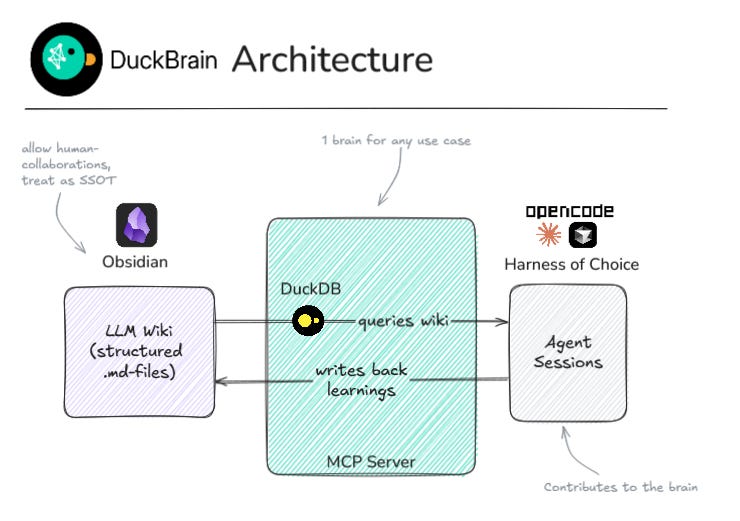
The vault is the same concept applied to agent memory. Markdown files as SSOT - not a vector database that syncs from them, not an API that abstracts them away. You can open them in Obsidian, edit them manually, grep them, commit them to git. The agent writes the bulk of the notes, and I still correct the summaries, add nuance, link things the agent didn’t connect. The filesystem makes that frictionless because both human and AI work on the same files. (Bring-your-own-compute, except the compute can also be your actual brain.)
Every other tool I evaluated wanted to move my memory into their database. I just wanted to query the files where they sit. For a data person, that distinction matters a lot.
At that point, I was committed. f** it, let’s try it.
Part 3: The Build
I sat down and said “let’s build an MCP server that queries the vault.” Three hours of vibe-coding later, DuckBrain existed. This wasn’t a one-sentence prompt - I used my usual spectrum development approach, planning out the architecture, scoping the MVP, then letting the agent write the code while I directed the structure and tested the results.
Why DuckBrain? It’s basically your second brain, powered by DuckDB. That’s the whole naming logic right there.
Four MCP tools:
vault_search- full-text search over wiki pages (DuckDB FTS, instantly reflects filesystem edits)vault_read- read any page by title or filepathvault_write- create new wiki pages or append to daily notes, with correct frontmatter and structurevault_info- vault stats (page counts, tags, last modified)
Right now it’s just structured read/write/search over markdown files. Vector embeddings, temporal decay, fact extraction - all things I’d be curious to explore. But not in the prototype.
(The logo, by the way, is 100% self-made in Inkscape. Couldn’t vibe-code that :-/ )
The vault has a schema: entities, concepts, sources, synthesis, daily logs. Each page type has its own directory, frontmatter conventions, and tags. The MCP server understands this and treats memory as structured pages, not raw text blobs.
Why build instead of adopt?
Mem0 is open source, but your memories live inside Qdrant vectors — you can’t open them in Obsidian, grep them, or edit them by hand. Even self-hosted, your data is in a black box. Open Brain (OB1) is the closest analog but syncs into Supabase, away from the filesystem. MemSearch captures to a flat .memsearch/ directory outside the vault. None of them could write structured entity/concept/source pages with proper YAML frontmatter.
The niche DuckBrain fills is specific: if your agent memory is a structured wiki you also browse in Obsidian, most tools don’t speak that language.
DuckBrain does. It fills a different niche than Mem0 or OB1 — smaller scope, different problem.
The philosophy is personal scale, not enterprise.
Scale:
Enterprise → hundreds of users, thousands of docs.
DuckBrain → One vault, hundreds of pages.
Infrastructure:
Enterprise → Kubernetes, vector DB clusters.
DuckBrain → Python + DuckDB, scoped for local use.
Setup:
Enterprise → Weeks of integration.
DuckBrain →
pip install, one config file.
Transparency:
Enterprise → Opaque (you query an API).
DuckBrain → Open (read the
.mdfiles).
Portability:
Enterprise → Vendor lock-in.
DuckBrain → Files on disk, any tool reads them.
Here’s the bet: for a solo knowledge worker or a small data team, the filesystem pattern delivers 80% of the value at 0.1% of the cost. It’s not enterprise software. Your Obsidian vault won’t scale to fifty coworkers sharing the same files anyways (I guess).
And the first vault_search call returning results from my actual vault?
That felt good.
What This Means
Three things stuck with me:
The agent memory space is still figuring itself out. Nobody has settled on the right approach yet. We’re all experimenting - the YouTubers, the open source projects, the solo builders. That’s exciting, but it means there’s no “just use X” answer yet. (And honestly, tomorrow OpenAI or Anthropic could ship a native memory feature that makes every existing solution obsolete overnight. Probably crushing a few VC-backed businesses in the process. That’s how it goes in a space this new.)
Human-in-the-loop is actually useful. Every vector DB solution stores memory in a format the human can’t read. You query it, you don’t browse it. The LLM Wiki pattern is the only approach where you can open the “memory” in a text editor, correct the agent’s notes, and steer the knowledge base directly. That matters more than I expected.
Building your own tool is a spectrum. You don’t have to choose between “adopt a mature tool” and “build everything from scratch.” DuckBrain is roughly 300 lines of Python that wraps DuckDB and maps to a specific vault schema. It exists because existing tools didn’t cover this specific need, not because I wanted to build a memory platform. That’s a valid middle ground.
So Which Memory Tool Should You Use?
From what I’ve seen in videos and READMEs: MemSearch seems solid if you’re on macOS and want semantic search. Open Brain looks like a good bet for cross-tool memory with a managed Supabase backend. Mem0 appears production-ready if you need fact extraction at scale - but I haven’t deeply tested any of them.
If you use Obsidian and want your agents to read from and write to the same vault you browse in - try the LLM Wiki pattern with DuckBrain. Any MCP-supporting agent that can install Python libraries should work. I built and tested it on WSL with Docker, but there’s nothing WSL-specific about it. It’s on GitHub. It’s one pip install away.
What’s your agent memory setup? I’m genuinely curious - this space is moving so fast that no single pattern has emerged yet. Drop me a note or comment.
Besides that, I would be obviously happy about feedback if you tried out DuckBrain and feel free to reach out in case you want to contribute.
p.s. If you try to run DuckBrain for fifty coworkers sharing one vault, things will get weird. This is personal-scale software. Plan accordingly.